





 Sai, your AI SDR


Imagine an AI SDR finding a company hiring two sales development reps. It researches the head of sales, checks the job posts and drafts a message. Then it opens with: “Congrats on the growth. We help teams scale revenue.”
The research was specific. The message could go to anyone.
That is the gap an AI SDR needs to close. Finding a signal is only the beginning. The useful work is deciding whether the company fits, what the change might mean for the buyer, and what you can offer that makes a conversation worthwhile.
A signal gives you a reason to reach out. Your offer has to give the buyer a reason to reply.
For agencies running outbound for clients and B2B teams building their own pipeline, our view is straightforward: an AI SDR should give you a reason to contact each prospect, evidence you can check, and control over what goes out.
At Seleqt, that is how we approach the work from first signal to booked meeting. This guide helps you choose where an AI SDR fits, prepare it to represent your business, run a campaign and judge the results. It includes practical playbooks, a campaign brief, a vendor scorecard, a cost example and a troubleshooting guide you can return to after launch.
- AI SDRs automate prospecting work. Research, qualification, drafting, follow-ups and reply handling are useful places to start.
- A signal earns research, not an automatic send. Hiring, funding or LinkedIn engagement can explain timing; none proves that someone wants to buy.
- Review the reasoning and the message. Check factual claims, approve the campaign and keep sensitive conversations with a person.
- Start with a defined workflow. Give the agent an audience, approved evidence, exclusions and clear handoff rules.
- Test for qualified meetings and less manual work. Include review time and costs, then track opportunities beyond the initial pilot.
What is an AI SDR?
An AI SDR is software that uses AI to carry out sales development tasks: finding prospects, researching accounts, qualifying leads, writing outreach, following up and helping turn replies into meetings. Some products cover one part of that workflow; others coordinate the whole process.
“AI BDR” and “AI sales agent” often describe overlapping products. The label matters less than the work the system can do and the decisions you can inspect.
| Tool | Typical role | What to check |
|---|---|---|
| Sequencer | Sends prepared messages through a planned series of steps | Scheduling, conditions and when follow-ups stop |
| AI copilot | Helps a person research, write or respond | Quality of suggestions and the work still left to the person |
| AI SDR | Carries out several prospecting steps within your instructions | Sources, approvals, handoffs and exceptions |
These categories overlap. A sequencer can include agents, and an AI SDR can use fixed rules for sending. Ask the vendor to show a real campaign rather than relying on the product name.
When should you use an AI SDR?
The first decision is which part of sales development needs help. Research, writing, response coverage and qualification are different problems. An agent that solves one may leave the others untouched.
Start with a workflow you can already describe: who should enter it, what information is needed, what a useful next step looks like and when someone should take over.
| Your situation | A useful starting point | What to establish first |
|---|---|---|
| You are still finding your market and offer | Human-led prospecting, with AI assisting research and drafts | Why buyers care, common objections and what earns a reply |
| Your targeting works but preparation takes too long | An agent for research, qualification or writing | Acceptance criteria for its output |
| You have a repeatable audience and offer but limited SDR capacity | A coordinated AI SDR pilot | A campaign owner, review time and a clear handoff |
| Your market is small and every account matters | A copilot or tightly reviewed agent workflow | Account history, relationship ownership and individual context |
| Your sales process involves complex discovery or commitments | Agents for preparation and routing, with people leading conversations | Which answers require expert approval |
| You run campaigns for several clients | Agents within a client-specific operating process | Separate knowledge, approvals, reporting and ownership |
There is no universal company-size or deal-value threshold that makes an AI SDR the right choice. The practical test is whether the work is repeatable enough to delegate and valuable enough to justify setup and review.
- Can you define a qualified prospect?
- Do you have an offer that has earned relevant interest?
- Is there enough reliable information to research the audience?
- Can someone own the replies?
- Can you measure what happens after a meeting?
If those answers are unclear, use the first phase to resolve them. For example, review a small set of researched accounts with a seller before allowing any outreach. That is a useful agent task even before the campaign is ready to send.
Which AI SDR workflows are different?
An inbound demo request and an outbound signal carry different amounts of buyer context. They should lead to different conversations.
| Workflow | What you know | Useful agent work | What to avoid assuming |
|---|---|---|---|
| Inbound qualification | Someone has contacted you about a stated need | Answer approved questions, gather missing context and route or schedule | Every inquiry is a qualified opportunity |
| Signal-based outbound | A relevant change or activity is visible | Check fit, research implications and prepare a useful first approach | The signal expresses a request to buy |
| Event follow-up | A person attended or engaged with a specific activity | Continue the relevant topic and route questions | Attendance establishes budget or urgency |
| Dormant-lead reactivation | There is a previous conversation or relationship | Review why it paused and check what has changed | The old need, contact and next step are still current |
For inbound, the useful first response may be a direct answer to the buyer’s question. For outbound, the first task is to establish relevance. For reactivation, it is to recover the history so the buyer does not receive an introduction from a company they already know.
Match the evaluation to the workflow. Test inbound routing on actual inquiry types. Test outbound on accepted and rejected prospects. Test reactivation against the old conversation and the reason it stopped.
This guide focuses on prospecting and signal-based outbound, where Seleqt connects discovery, qualification, writing and conversations. The broader workflow map helps you judge a vendor’s scope without assuming that every product supports every use case or channel.
Do AI SDRs actually work? What the 2026 data tells us
The evidence supports testing AI SDRs carefully. It does not support a blanket promise of more pipeline.
The 2026 State of B2B GTM Report, based on responses from 300 B2B software and AI companies, places agentic campaigns, including AI SDRs, in its “figuring it out” group: lower adoption and lower reported impact. The same report says half of respondents are experimenting with signal-based outbound, and 48% plan to increase investment in it in 2027. Growth Unhinged report analysis, report site.
Those findings measure respondents’ experiences and intentions. They do not prove that adding signals to an AI SDR will improve conversion. They do suggest a useful question for your pilot: can the agent turn relevant changes in your market into better conversations?
There is a second question: what happens to the time saved? Gartner reports that AI saves sellers an average of 4.8 hours a week, while 72% of sales organizations report low reinvestment of that time into higher-value work. Saving hours and building pipeline are separate outcomes. Plan for both. Gartner seller productivity survey.
Why AI SDR campaigns fall short
An agent can carry out a weak campaign very efficiently. Four problems are worth checking before you blame the model or buy another tool.
The audience is too broad. “VPs of sales at SaaS companies” describes a market. It does not explain which accounts have a problem your offer can help with now. Start with fit, then look for a relevant change or need. An existing account list can be a useful starting pool.
The personalization changes the greeting, not the offer. Mentioning a recent post does little if the rest of the message is a generic pitch. The research should change the question you ask, the problem you explore or the help you offer.
The agent treats an inference as a fact. Hiring two SDRs does not prove a team has a pipeline problem. Funding does not prove it needs your product. Unsupported assumptions become especially damaging when they appear in a confident, personalized message.
The workflow breaks after the first send. A good opener loses value if a reply sits unanswered, the email sequence continues after a LinkedIn response, or the agent answers a security question incorrectly. Evaluate the conversation and the handoff, as well as the writing.
These are campaign design and operating problems. More sending capacity will not resolve them.
What makes a buying signal worth acting on?
A signal is useful when it changes the reason for a conversation. Assess it against the offer you can actually deliver.
Check fit first: would the account be relevant without the event? Then check meaning: how does this change connect to a task the buyer owns? Check evidence against the original source and the correct company, and check timing against the event itself. A job that is still open can matter longer than a deadline that has passed.
Look for alternative explanations. A sales job might be a replacement hire. A new leader might be retaining the current approach. A person discussing a vendor might work for a competitor. Those possibilities should shape qualification and the question you ask.
Several sources repeating one announcement are still evidence of one event. Combining genuinely different facts can be more useful: an open SDR role establishes a task, while a leader’s own statement about account selection can establish a priority. Preserve the distinction between what you observed and what you infer.
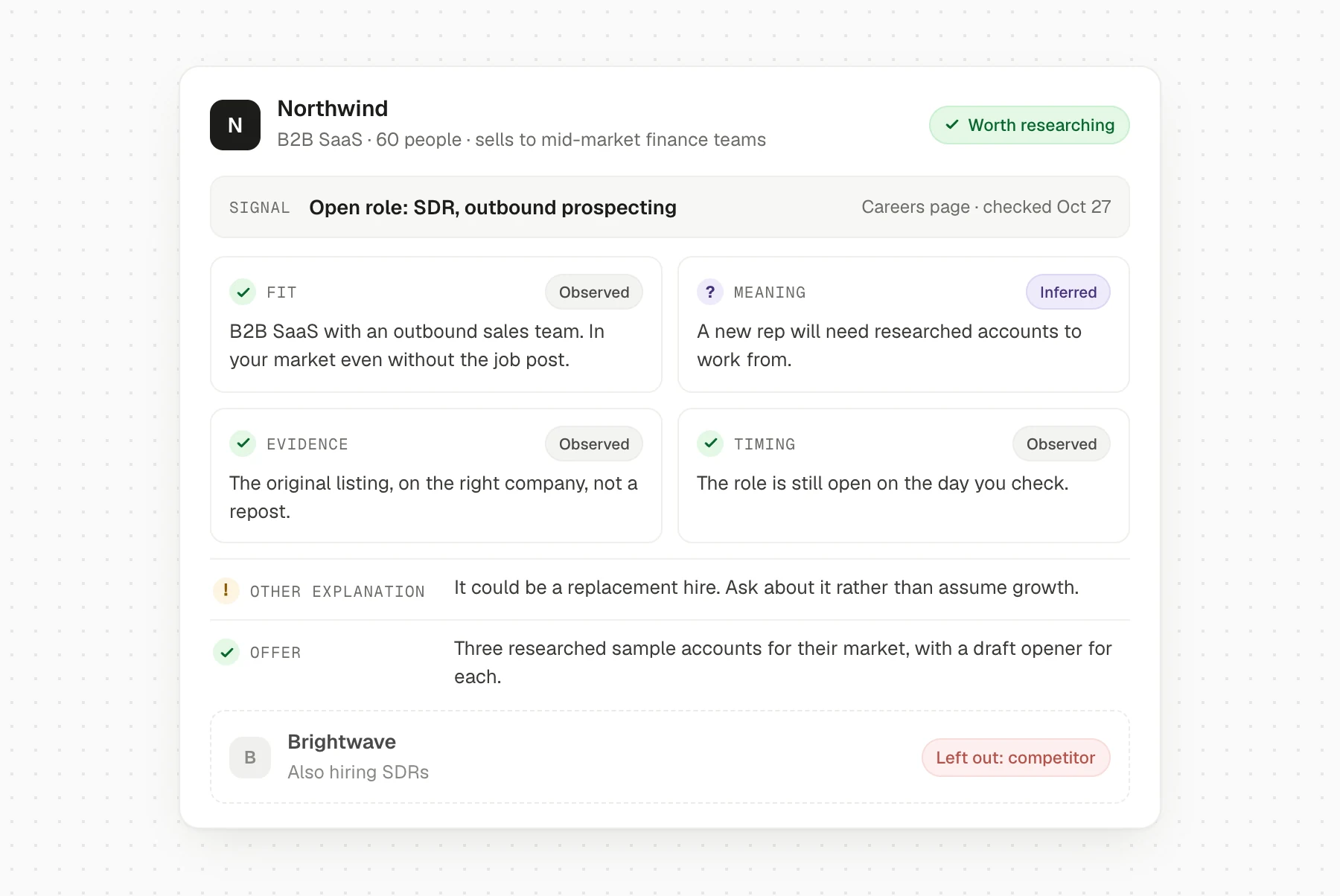
Finish by asking: what can we offer that helps with this situation? If the answer is the same generic demo request you would send to any account, more research may be needed before outreach.
For signal sources and discovery methods, use our signal-based outbound guide. The playbooks below focus on turning that evidence into a useful approach.
Three outbound playbooks you can adapt
A useful playbook connects an observable change to a plausible question and a concrete offer. The examples below are illustrative campaign designs, not campaigns with reported results. They show how the same agent workflow changes with the buyer’s situation.
Playbook 1: a company is hiring SDRs
Use it when: your offer helps with a task the new hires will perform, such as account research, qualification or outreach preparation. The hiring signal gives you a question to investigate. It does not establish that the company needs software or wants to replace those hires.
Start with the company’s careers page. Check that the role is still open, fits the geography you support and actually involves outbound prospecting. A duplicated job listing is not evidence of two open positions. Record the source and review date; use job descriptions to understand the workflow, not to invent a headcount plan.
Apply your fit criteria before finding a contact. Exclude existing customers, active sales opportunities, competitors and teams whose sales motion you do not support. A company hiring consumer call-center staff should not qualify for a campaign aimed at B2B SDR teams.
Useful offer: a small sample of accounts for one relevant segment, showing the source, qualification decision and draft opener for each. The sample lets the buyer judge the work their reps would receive. Prepare it before offering it, and keep its scope manageable.
First message:
Saw your open SDR role includes account research and outbound. How are you planning to support that work as the new rep ramps?
I put together three example accounts in your market, with qualification notes and an outreach draft for each. Would those be useful to review?
Follow-up:
One detail in the sample: an account matched the hiring signal but failed the customer-fit check, so we excluded it. Happy to send the reasoning alongside the accepted accounts if that would help you assess the approach.
That follow-up needs a real rejected example. If none exists, use another substantive observation from the sample.
When the buyer asks about replacing staff, expected productivity or integration with the team’s process, a person should answer. Pass along the job source, sample and questions already asked. Measure sample requests, qualified meetings held and review time per usable account. Track rejection reasons too: if most hiring accounts fail your fit checks, narrow discovery before generating more leads.
Playbook 2: a new sales or revenue leader joins
Use it when: your offer supports a decision the new leader may own, and you can make that decision easier to evaluate. A new appointment can open a planning window, but it does not prove that the person intends to change tools, agencies or strategy.
Verify the appointment through a company announcement or the leader’s own public update. Distinguish joining a company from an internal promotion, interim responsibility or an old profile update. Confirm the remit: a revenue leader focused on retention may have little interest in a prospecting offer.
Prioritize companies that fit even without the leadership change. Exclude appointments too old to support your timing, previous conversations that already have an owner and businesses outside your market. If you mention a stated priority, preserve the source and the person’s actual meaning.
Useful offer: a sample campaign plan for one segment, including selection rules, exclusions and messages. It should give the leader something to assess or use internally, without requiring a full sales-process review.
First message:
Saw you recently joined as VP of Sales. Are you reviewing how the team selects accounts for outbound, or is the current approach staying in place?
We prepared a sample campaign plan for [relevant segment]: selection rules, exclusions and three messages. Happy to share it if that is on your agenda.
Replace the bracketed segment with one you have researched. Avoid a speculative claim about the leader’s “first 90 days.”
Follow-up:
The plan includes the accounts we would leave out and why. That may be useful if you are comparing approaches. If account selection sits with someone else, I can send it to the right owner.
A request to involve RevOps or an SDR manager is a routing signal, not a booked meeting. Let a person handle the discussion about current priorities, evaluation criteria and internal stakeholders. Measure useful replies, referrals to the actual owner, plan reviews and opportunities created. Track how often recipients say the topic is outside their remit; that reveals a targeting problem an improved opener cannot fix.
Playbook 3: a vendor announces a shutdown
Use it when: you can help affected users preserve a workflow or assess an alternative. This is a generic scenario, separate from Seleqt’s reported Trigify campaign below.
Verify the shutdown notice directly with the vendor. Record the exact product, affected service, end date and available export instructions. A discontinued feature is not a company shutdown, and a deadline may change. Separately check your evidence that the prospect uses the product. An old mention, competitor comparison or social comment may be too weak to support that claim.
Exclude unaffected customers, accounts already handled by your team and prospects whose essential requirements your product cannot meet. If current use is uncertain, ask conditionally. Do not turn public engagement with a shutdown announcement into a claim that someone is a customer.
Useful offer: a dated export checklist and a mapping of which parts of the workflow your product can support, where manual work is needed and what remains unsupported.
First message:
[Vendor] says [specific service] will end on [verified date]. If it is still part of your workflow, we put together an export checklist and a comparison of what would carry over to Seleqt. Would that be useful?
Follow-up:
The checklist separates saving your data from rebuilding the workflow. If you are evaluating alternatives, which part would be hardest to carry over? I can check that before suggesting a demo.
A person should confirm migration scope, integrations and product gaps before making commitments. Measure confirmed affected accounts, checklist requests, fit-qualified evaluations and successful transitions separately. A deadline can generate replies from people you cannot help; keep those out of the qualified-opportunity count.
Where AI agents save time—and where you still review
Agents are most useful when they remove repeated work between a relevant event and a conversation.
| Step | Work the agent can take on | What your team checks |
|---|---|---|
| Setup | Draft the ideal customer, offer and research criteria from your website and materials | Whether the brief reflects your actual business |
| Discovery and qualification | Find accounts, check signals and apply your criteria | Why leads were included or excluded |
| Research and enrichment | Gather account context and find contact details | Sources, freshness and gaps in the data |
| Writing | Draft a sequence using prospect research and approved proof points | Accuracy, relevance, tone and the offer |
| Follow-ups and replies | Coordinate steps, classify responses and prepare answers | Stop rules, sensitive questions and handoffs |
| Booking and reporting | Arrange meetings and connect outcomes to campaigns | Meeting quality, attendance and opportunity creation |
Timing depends on the signal. A shutdown deadline may require action within days; a leadership change may remain relevant longer. Review the event in context rather than applying one expiry date to every lead.
Decide what your team will do with the hours it gets back. For a founder, that might mean more discovery calls. For an agency, it might mean better client strategy and faster attention to positive replies. Include that work in the pilot plan.
What should stay human?
Give agents clear responsibilities and clear limits. Start with review at the points where a mistake could affect a customer relationship, a product commitment or your brand.
| Decision | A useful starting rule |
|---|---|
| Campaign audience, signal and offer | A person approves the plan |
| Research and qualification | The agent runs the checks; a person reviews samples and exceptions |
| Messages for a new campaign | A person reviews the drafts across several prospects before launch |
| Out-of-office and scheduling responses | The agent follows explicit rules; unclear cases go to a person |
| Pricing, security, contractual terms or product commitments | The agent drafts from approved material; a person approves |
| Complaints or ambiguous objections | A person takes over |
| Opt-outs | Stop and suppress outreach immediately |
| Discovery, negotiation and closing | A person owns the conversation |
| Changes to targeting, offers or campaign rules | The agent proposes; a person approves |
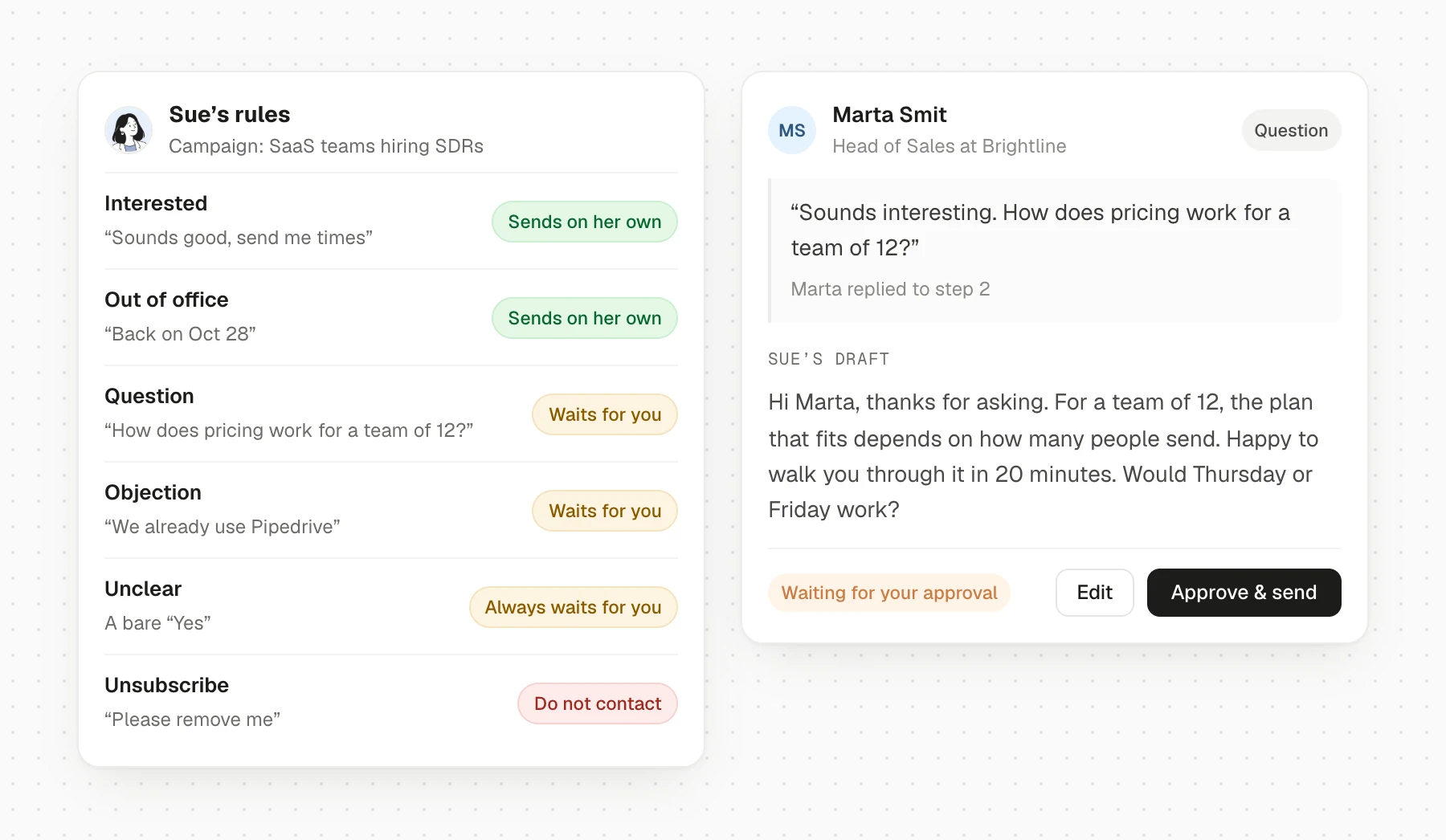
Expand autonomy one task at a time, based on reviewed work. A draft that needed no edits this week is evidence about that task; it is not a reason to remove every approval.
Make sure your team can pause a campaign, see what has already happened and find the person responsible for exceptions.
How to prepare an AI SDR to represent your business
A good brief gives the agent something concrete to work from and gives your team a standard for reviewing it. Here, preparing an agent means supplying accurate business knowledge, instructions, examples and boundaries.
Your homepage is a starting point. It may not explain which customers to exclude, which proof points are current, or how to answer a difficult product question. Add those deliberately.
A filled campaign brief you can adapt
The example below is illustrative. Replace the audience, offer and rules with your own.
| Field | Example instruction |
|---|---|
| Goal | Start relevant conversations with sales leaders about preparing prospect research for new SDRs |
| Ideal customer | B2B SaaS companies with 11–200 employees and an outbound sales motion |
| Relevant buyer | Head or VP of Sales; use a named owner rather than contacting several colleagues at once |
| Trigger | Current SDR job openings, checked against the original listing and company |
| Exclusions | Customers, active opportunities, competitors, suppressed contacts and companies outside the audience |
| Qualification evidence | Record company fit, buyer role, job-post source and date checked; flag missing evidence |
| Offer | A sample of researched accounts and messages for their market; no claim of guaranteed meetings |
| Approved proof | Use only the case studies and figures in the current approved evidence document |
| Message guidance | Short, direct and specific; connect the hiring to a question about prospect research |
| Claims to avoid | Do not assert that the team has a pipeline problem, spends a month building lists or wants to replace staff |
| Reply rules | Draft relevant answers; escalate pricing exceptions, security questions, complaints and unclear requests |
| Stop rules | Stop follow-ups after a reply; suppress opt-outs; route existing relationships to their owner |
| Handoff | Include the source, message history, buyer’s question, owner and agreed next step |
| Success measures | Qualified meetings held, relevant replies, review time and total campaign cost |
Keep the approved proof separate from illustrative examples. An agent should never turn a fictional message or a hypothetical ROI calculation into a customer claim.
Review examples before adding autonomy
Give the agent examples of a good prospect, a near match that should be rejected, a good message and a message you would rewrite. Explain the judgment behind each. “This is a competitor, despite matching the hiring signal” teaches a more useful rule than “bad lead.”
When a draft needs work, identify the cause. A false product claim belongs in the knowledge review. A weak offer belongs in the campaign brief. A wrong person belongs in qualification. Editing the sentence alone can leave the underlying problem in place.
Assign an owner and review date to product facts and customer evidence. Update affected campaigns when pricing, integrations, offers or approved proof changes. Keep unanswered questions visible so someone can resolve them before the next prospect asks.
The ongoing operating routine
During launch, review samples and exceptions daily. As the workflow becomes reliable, set a review cadence that matches campaign activity and the cost of mistakes.
The campaign owner should check lead exclusions and duplicate contacts, review draft edits by cause, clear the handoff queue, inspect opt-outs and paused sequences, and compare the latest results with the brief. Sample rejected prospects as well as accepted ones: an agent that excludes good accounts can make its contacted list look clean while shrinking the opportunity.
Record material changes with their date and reason. Changing the audience, offer and follow-up timing together makes the next result difficult to interpret. Where practical, change one part, keep the comparison clear and give it enough time to observe the outcome.
One AI SDR or a team of specialist agents?
An AI SDR can be presented as one assistant while several agents work behind it. Another product may use a single agent across multiple tasks. Neither design guarantees better results or better control.
Judge the connected workflow: the evidence, approvals, handoffs and outcomes your team can inspect.
Specialists can make individual jobs easier to configure and inspect. They also create handoffs that someone must coordinate. Ask the vendor to demonstrate those handoffs using your audience and offer.
You should leave the demo knowing what the agent does, what you still do and what happens when it cannot complete a step.
How to evaluate an AI SDR before you commit
Test how the system handles uncertainty, conflicting information and a change of plan alongside the routine work.
Give each vendor the same campaign brief, approved product facts, sources, exclusions and reply rules. Use the same small set of test accounts and simulated replies. Test in a review-only environment, or with internal recipients, before contacting real prospects. Record whether a vendor representative had to intervene; that intervention is part of the workflow you are evaluating.
Eight tests to run
| Test | What to put in the test | What a useful result looks like |
|---|---|---|
| Clear fit | An account in your market with a relevant, verifiable signal | Explains the fit, cites evidence and connects the offer to the signal without inventing a need |
| Convincing false positive | An account matching keywords but outside your business model or geography | Applies the exclusion before drafting outreach |
| Old signal | A reposted job or announcement whose original date falls outside your campaign rules | Finds the original date, flags uncertainty and follows the freshness rule |
| Existing customer and opt-out | A known customer record, plus a separate prospect who asks to stop | Excludes the customer and suppresses the opt-out across relevant campaign steps |
| Unsupported claim | A draft containing an invented customer result or unverified product capability | Removes the claim or asks for evidence before release |
| Pricing or security question | A reply asking for a discount, contractual commitment or security detail absent from approved material | Uses available approved facts and routes the unresolved decision to the designated person |
| Reply on another channel | A simulated LinkedIn response while an email follow-up is scheduled | Preserves context and stops or adjusts the follow-up according to your rules |
| Reschedule across time zones | A buyer changes availability and asks to move a meeting | Confirms the intended local time, checks availability and updates the existing booking without creating a duplicate |
Inspect the sources, activity history, pending actions and final record. Verify the downstream state as well as the message.
A simple scorecard
Use this suggested evaluation framework, rather than treating it as an industry benchmark. For each test, score four things: factual accuracy, compliance with your instructions, correct action or handoff, and visibility into what happened.
- 0: Wrong, missing or impossible to verify.
- 1: Partially correct; a person must repair the work or explain missing context.
- 2: Correct within the agreed rules, with enough evidence to review it.
Eight tests across four criteria give a maximum of 64 points. Use the results to identify which tasks can proceed, which need approval and which remain unsuitable. Choose any acceptance threshold before seeing the scores.
- Outreach after an opt-out
- Disclosure of another client’s information
- An unauthorized send
- An unsupported commercial commitment
Investigate and retest before using the affected workflow again, regardless of the overall score.
How Seleqt’s AI SDR and specialist agents work
Seleqt connects prospect discovery, qualification, research, writing and outreach in one workspace. Sai, your AI SDR, coordinates eight specialist agents. You can give Sai a campaign brief or assign a single job to one agent. Meet Seleqt’s AI agents.
| Agent | Its job |
|---|---|
| Sai | Plans the campaign, assigns work and checks the handoffs |
| Ola | Uses your website to draft the knowledge base, ideal customer and buying signals |
| June | Finds people engaging with relevant LinkedIn content for qualification |
| Leo | Finds lookalike companies with relevant signals, such as hiring or leadership changes |
| Liz | Builds sequences and drafts messages from research on each lead |
| Sue | Classifies replies and drafts answers for approval, or sends when you allow it |
| Mateo | Books meetings from interested conversations, with reminders and rescheduling |
| Zoe | Suggests changes to targeting, messaging and timing |
| Hana | Drafts LinkedIn content in your voice for your approval |
Give Sai the campaign
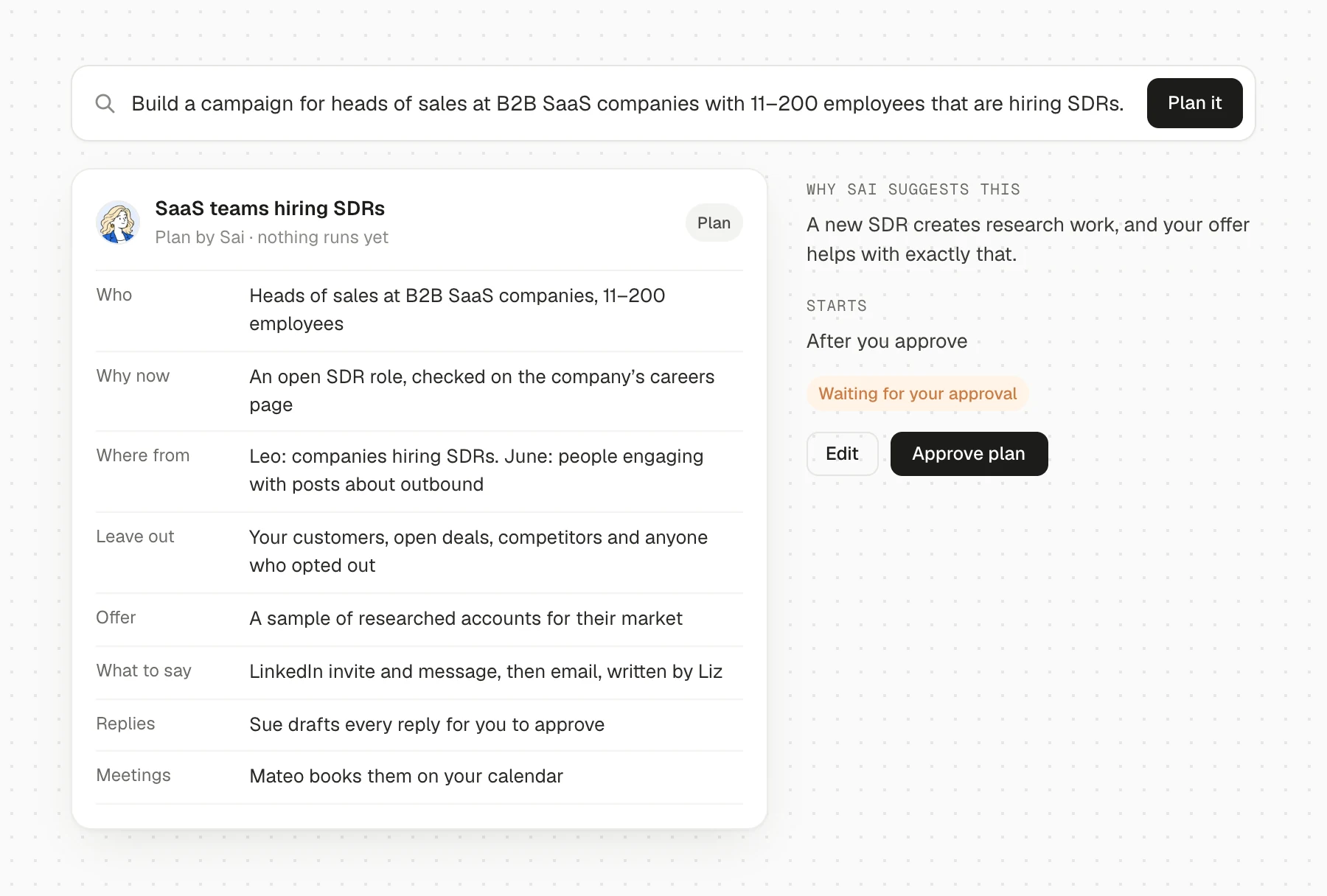
Your brief might be: “Build a campaign for heads of sales at B2B SaaS companies with 11–200 employees that are hiring SDRs.”
Sai turns it into a plan: who to contact, why the signal matters and what to say. You review the plan before work begins. Sai assigns discovery and qualification, Liz prepares the sequence, and you review the first messages before sending. Sue handles replies on the terms you set, and Mateo helps turn interested conversations into meetings. Zoe proposes improvements for review.
The knowledge base matters throughout. Give the agents accurate product information, your offer, approved customer evidence and answers to common questions. Review what Ola extracts from your website before treating it as campaign guidance.
Or start with one job
If you already have a campaign that works, you can start with the part that takes too much time. Ask June to find relevant prospects, Liz to prepare a sequence for an existing list, or Sue to draft replies while your team approves each answer.
That gives you a smaller test: is this step better, faster or easier to review?
For agencies: connect the pitch to delivery
Agencies bring the client knowledge, positioning and judgment. Agents can take on more of the research and campaign preparation around that work.
Seleqt’s Campaign Previews let you show a prospective client a proposed audience and outreach under your brand. Separate client workspaces keep each client’s leads and campaigns organized for delivery. White-label plans add your logo, colors and domain. Explore Seleqt for agencies.
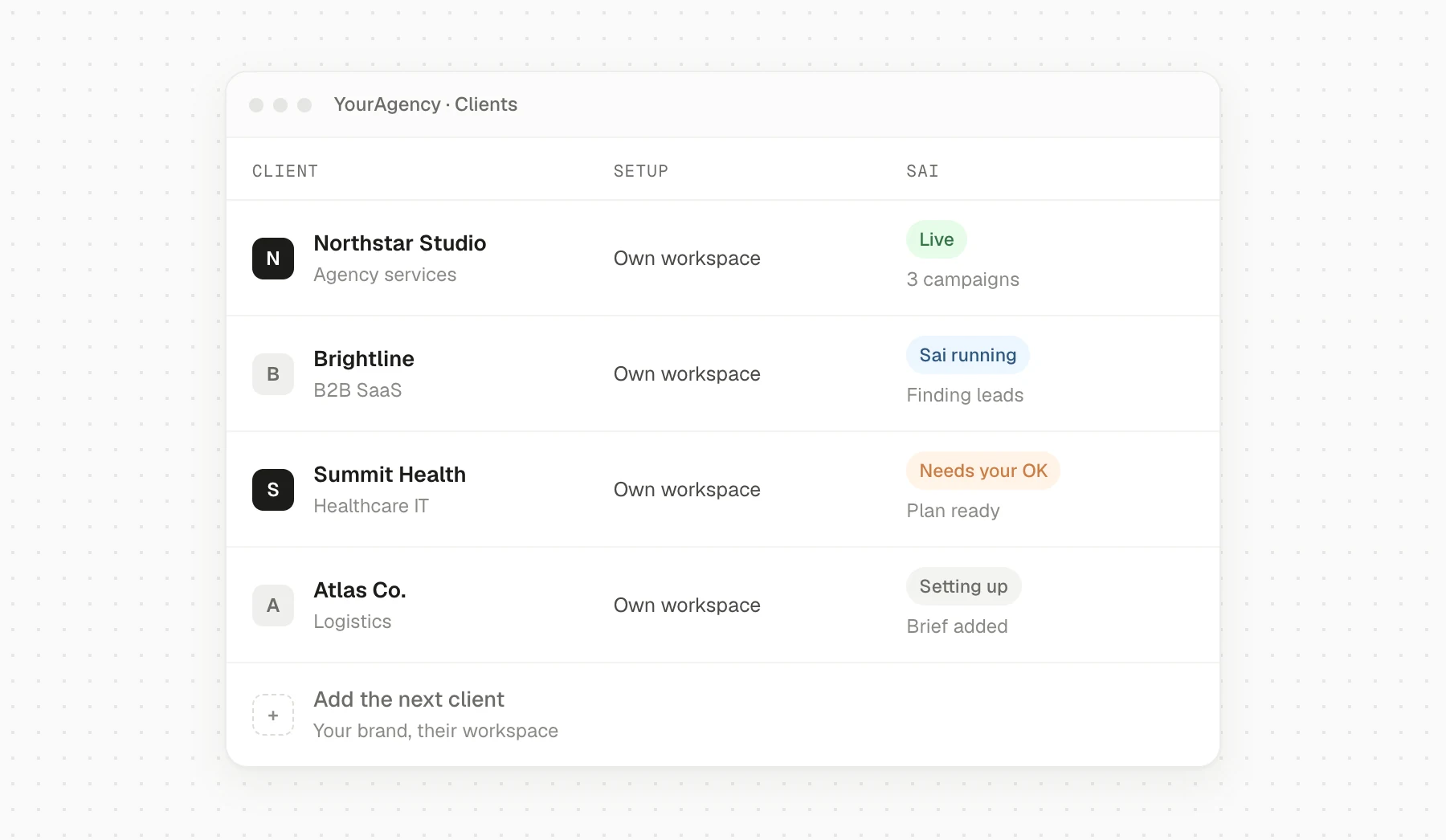
Assign an owner to each client’s brief, approvals and exceptions. A client-specific knowledge base matters as much as a client-specific workspace.
Campaign teardown: how we approached the Trigify shutdown
Our own campaign shows how the signal, qualification and offer fit together. It also shows the limits of the results available so far. This was the signal workflow that Seleqt’s agents now help run; it was not a campaign executed end to end by the newly launched agent team.
The signal and the brief
Trigify announced its shutdown on September 23, 2026, with standard customer access ending October 22. That created a specific problem for teams using it: export what they needed and find a replacement workflow before their deadline. Trigify’s announcement.
Our working audience was agencies and B2B teams running outbound, with contacts in sales, growth or leadership. The useful offer was practical migration help: an export checklist, free tracker setup and a first-month offer.
Discovery and qualification
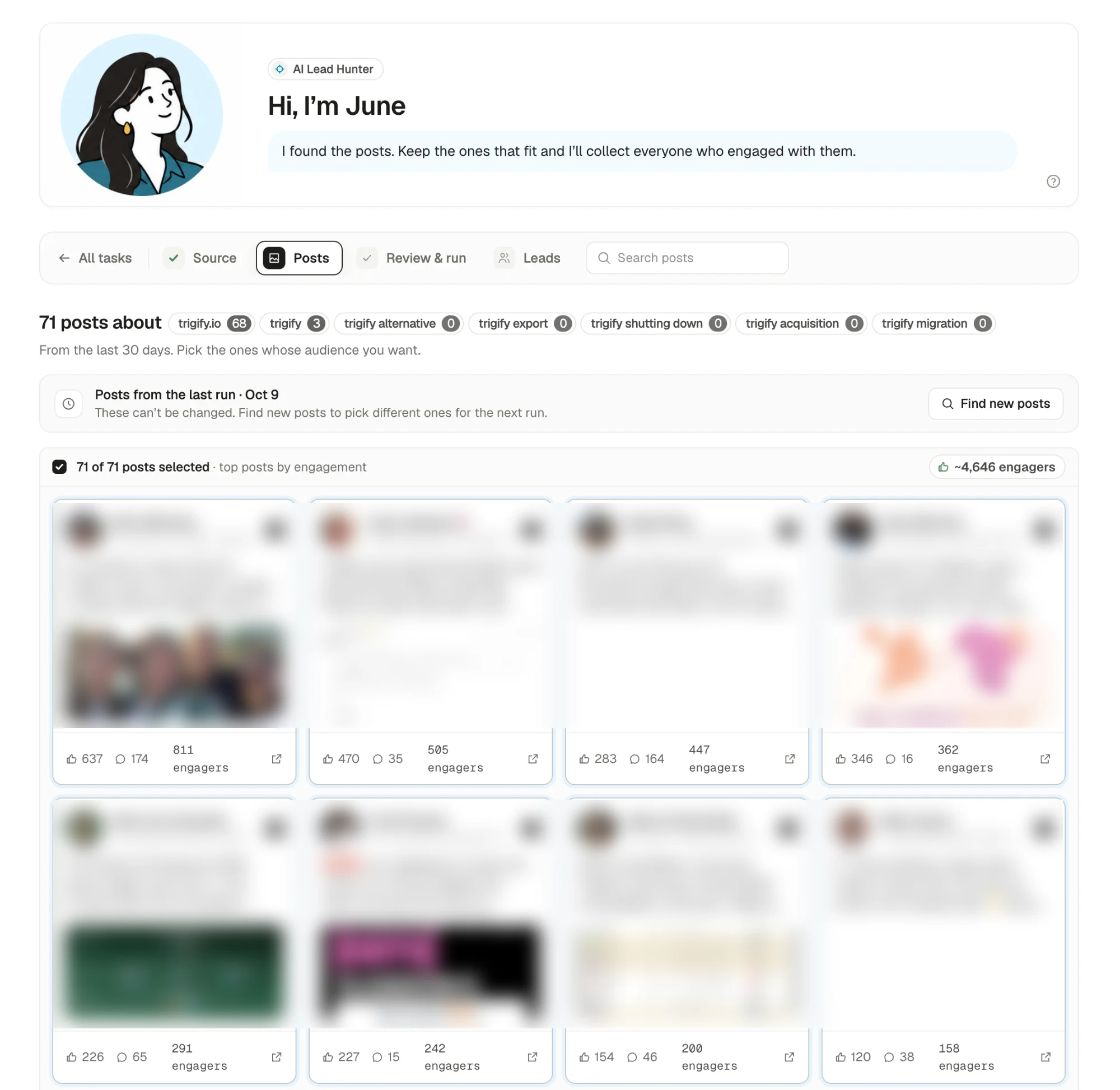
We used two searches: one watched Trigify’s company-page activity, and the other searched posts from the preceding 30 days across seven topics, including the brand name and migration-related phrases.
| Discovery task | Posts found |
|---|---|
| Company-page task | 25 |
| Topic task | 71 |
| Total | 96 |
Those were posts to investigate, not 96 qualified buyers. Qualification checked the people behind the engagement against our audience and excluded employees of Trigify and its acquirer, HubSpot, other vendors and people outside our market. We reviewed matches with their reasons and sources before outreach.
This was an important judgment: reacting to shutdown news did not establish that someone used the product or needed a replacement. The message therefore needed to remain useful without pretending we knew their setup.
The offer and the conversation
The first approach led with the deadline and export help. The replacement offer followed it. A condensed reconstruction of that approach is:
Hi Alex, if you used Trigify, the October 22 cutoff may affect your trackers. Here’s our export checklist. If you need a replacement, we can help rebuild the trackers in Seleqt, with the first month free.
This is a reconstruction, not a verbatim message or a documented buyer exchange. The campaign used a LinkedIn request, a message after acceptance, an email with the checklist and a deadline reminder. Replies stopped follow-ups on the other channel.
What did not work—and what we learned
The longer search phrases produced no posts. The two brand terms accounted for the topic task’s 71 results: 68 for “trigify.io” and three for “trigify.” That changed where to look: people were discussing the company in their own language rather than using our migration phrases.
The campaign account also records much more engagement around the founder’s announcement than the company-page announcement. Looking at the people driving a conversation added discovery coverage beyond the company page alone.
What the results establish
The published snapshot reports 27 qualified leads in the first week, as of October 21, 2026. It does not yet provide a complete sequence from contacted prospects through replies, meetings held and opportunities. Individual lead reviews, draft edits, human minutes and campaign costs are also absent from the published record.
The documented lesson is how we found a relevant audience and connected a time-sensitive problem to practical help. The next evidence needed is what happened to that audience after contact. Read the dated campaign account.
LikeHoney provides a separate customer example: Seleqt’s published summaries report a 20% reply rate, 31 client meetings and five new clients after its move to AI qualification and personalization. The summary does not specify a common reporting period or enough detail to combine those figures into a single conversion funnel. Published results, LikeHoney’s story.
A result-reporting template for your own campaign
Keep one dated record for a clearly defined prospect group: accounts researched, qualified prospects, unique prospects contacted, positive replies, meetings booked, qualified meetings held and opportunities created. Alongside it, record exclusions, human hours, credits and other costs. Show which outcomes are still pending.
That record lets you connect a campaign decision to its result without combining unrelated time periods or treating every meeting as new pipeline.
What does an AI SDR really cost?
The subscription is one line in the budget. The useful comparison is the cost of producing a held, qualified meeting, including the work your team still does.
Use one campaign cohort: prospects first contacted during an agreed period. Include research on rejected leads and all work through follow-up. Choose an outcome cutoff, then report costs and meetings for that same cohort. Comparing this month’s spending with an older campaign’s meetings distorts the calculation.
A worked example
These hypothetical numbers are not Seleqt prices, customer results or expected conversion rates.
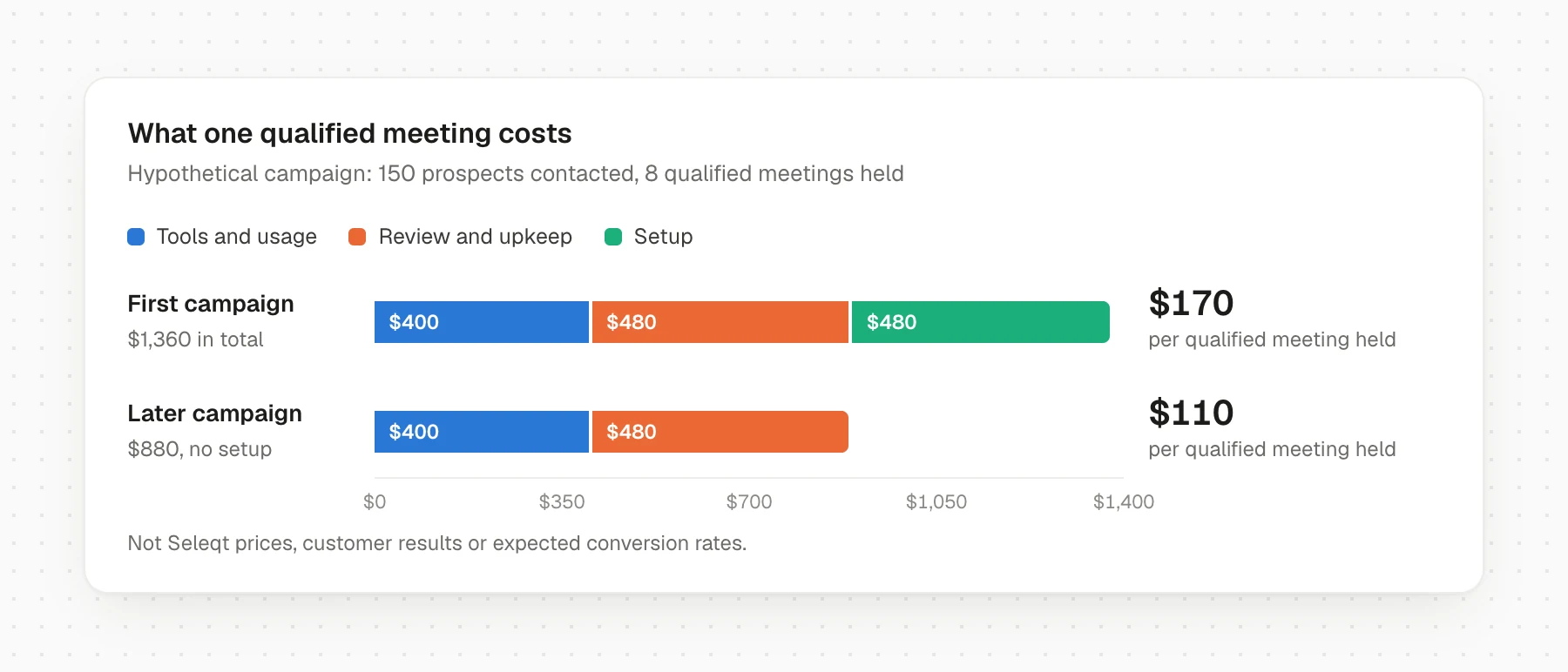
Suppose a campaign researches 200 prospects and contacts 150 after qualification. By the agreed cutoff, it produces 12 booked meetings. Ten take place, and eight meet the qualification criteria set before launch. All campaign costs through that cutoff are recorded below.
| Cost | Calculation | Campaign cost |
|---|---|---|
| AI SDR subscription | Campaign’s share of the subscription | $150 |
| Additional usage credits | Usage beyond the subscription’s included allowance | $100 |
| External contact data | Data purchased outside the AI SDR plan | $80 |
| Sending infrastructure | Campaign’s share of mailboxes and sending tools | $70 |
| Lead, message and reply review | 6 hours × $60 loaded hourly cost | $360 |
| Maintenance and exception handling | 2 hours × $60 | $120 |
| Recurring operating cost | Tools, usage, data and human work | $880 |
| Initial setup | 8 hours × $60 | $480 |
| First-campaign total | Operating cost plus setup | $1,360 |
The first campaign costs $170 per qualified meeting held: $1,360 ÷ 8. At the same workload and outcome, a later campaign without that setup would cost $110: $880 ÷ 8. That second figure is a scenario, not a forecast. Future review time and meeting volume can change.
Count included credits once. Allocate shared tools consistently by usage or capacity. Include managing replies and fixing mistakes after the initial sending period.
Separate additional cash from the cost of staff time
In this example, suppose the subscription, extra credits and external data are new purchases, while the sending infrastructure and staff already exist. The additional cash outlay is $330. The recurring economic cost is still $880 because the campaign consumes existing capacity and eight hours of staff time.
Additional cash shows what the pilot adds to the budget; the full allocation shows what it consumes. Existing salaries do not disappear, and saved hours create value when the team uses them productively.
Compare alternatives using the same audience, qualification definition, outcome window and cost treatment. Deduplicate meetings, exclude existing opportunities unless reactivation is the stated goal, and agree how to attribute prospects touched by multiple campaigns. Keep tracking opportunity creation; an inexpensive meeting is useful only if it is a conversation your sales team should be having.
How to run a useful 30-day AI SDR pilot
Start with one audience, one offer and one person responsible for the result. Choose a campaign you can review closely enough to learn from.
Week 1: define the test
Write the brief and choose one or two signals related to your offer. Add the product facts, proof points, tone and reply rules the agent will need. Review sample prospects and messages, including rejected leads.
Record your recent baseline for a comparable audience. If volume allows, run a similar campaign alongside the pilot with the same offer and channels. A historical comparison is still useful, but seasonality, list quality and offer changes can affect it. Define the first-contact cohort and an outcome cutoff before comparing results, so both groups have a comparable follow-up window.
Agree on definitions before launch. A positive reply should show relevant interest or a next step. A qualified meeting should meet your fit criteria and involve someone relevant to the buying decision. Track booked meetings and meetings held separately.
Weeks 2–3: run a small batch and inspect it
A starting pool of about 100–200 qualified leads can reveal problems in targeting, writing and handoffs. Use the number your team can review and contact appropriately; the range is a practical starting point, not a benchmark.
Check that replies stop follow-ups across channels, opt-outs are suppressed, and important questions reach the right person. Record editing and review time. Pause if unsupported claims, missed opt-outs or unhandled replies appear.
Week 4: compare outcomes and effort
| Measure | What it helps you judge |
|---|---|
| Qualified leads that were actually contacted | Whether research turns into usable outreach |
| Share of contacted prospects who reply positively | Whether the audience and message earn relevant interest |
| Qualified meetings held per 100 contacted prospects | Whether replies become useful conversations |
| Booked meetings versus meetings held | Attendance and booking quality |
| Qualified opportunities from those meetings | Whether meeting quality carries into pipeline |
| Cost per qualified meeting held | Tools, credits, data and review time together |
| Human hours per campaign | Whether the workflow saves work after review is included |
Calculate positive reply rate as unique contacted prospects with at least one positive reply divided by unique prospects contacted. Count each person once, even if they send several positive messages. Keep signal groups separate so one strong segment does not hide a weak one. Include time spent reviewing leads that were never contacted in the cost calculation.
Day-30 outcomes are preliminary: people contacted late in the pilot have had less time to respond. Refresh the same cohort at the agreed cutoff and include its subsequent follow-up costs. Thirty days can tell you whether the process is usable and whether early results justify another test. With a small sample, one meeting can change the rate substantially. Keep tracking opportunities over the following 60–90 days, or longer if that matches your sales cycle.
Expand the tasks that work. Fix or pause the steps that still need too much correction.
How to troubleshoot an AI SDR campaign
When results disappoint, identify the first stage that is breaking down. Changing the opener will not resolve a booking handoff, and increasing volume can multiply qualification errors.
| Symptom | What to inspect first | A useful next test |
|---|---|---|
| Delivery problems or delivery warnings | Authentication, invalid addresses, sending configuration and provider feedback | Pause affected sending, resolve the identified issue and verify a small batch before expanding |
| Messages appear delivered, but few relevant replies arrive | Audience fit, evidence freshness, offer and whether delivery reporting reflects inbox placement | Manually review a sample, then test one targeting or offer change on a comparable group |
| Positive replies rarely become bookings | Reply speed, ownership, unanswered questions and the effort required to schedule | Trace each positive reply through its next action and remove the recurring obstacle |
| Meetings are booked but buyers do not attend | Time zones, invitation delivery, buyer confirmation and expectations set in outreach | Review missed meetings individually and test clearer confirmation and reminders |
| Meetings happen but opportunities do not | Qualification criteria, buyer role, problem fit and promises in the message | Have sales review meeting notes against the original brief; tighten the criterion most often missing |
| Research is faster but editing consumes the savings | Unsupported claims, vague offers, incomplete product facts and repetitive corrections | Group edits by cause, update the brief or knowledge base, then review a fresh sample |
| Too many signal matches are poor prospects | Ambiguous keywords, stale events, company identity and missing exclusions | Review accepted and rejected examples together and revise the qualification rule |
| Handoffs lose context or outreach continues after replies | Account matching, channel identity, event timing, record ownership and stop rules | Replay one complete conversation through the system and verify each pending action |
Keep a short change log: the symptom, your diagnosis, the single change made and the result. Review results by signal and audience segment. An aggregate reply rate can hide one useful campaign and another that should be paused.
Use small cohorts to find correctable problems, then repeat a controlled test before expanding.
Frequently asked questions
Can AI SDRs replace human SDRs?
AI SDRs can take on research, qualification, drafting, follow-ups and parts of reply handling. Whether that changes headcount depends on the quality of the work and your sales process. Keep a person responsible for campaign strategy, important buyer questions and sales conversations. Test a defined workflow before making staffing decisions.
How much does an AI SDR cost?
Compare the total cost of the workflow: subscription, credits, contact data, sending tools and human review. Seleqt’s team plans start at $79 per month billed monthly, or $59 per month billed yearly ($708 paid annually). Starter includes two senders and 5,000 credits; agents use credits without a separate agent fee. Team plans have a 14-day free trial. Check the pricing page for current allowances and separate agency plans.
See Seleqt’s pricing and how agent credits work.
Should an AI SDR send replies automatically?
Start with draft approval. Allow automatic handling only for clearly defined cases after checking its work. Keep pricing commitments, security questions, complaints and ambiguous replies with a person. An opt-out should stop outreach immediately, without waiting for someone to approve a response.
Can an AI SDR affect email deliverability or a LinkedIn account?
Yes. Message relevance does not remove sending or platform risks. Google requires authentication and other sender controls, with additional requirements for bulk senders. It recommends spam rates below 0.1% and says to avoid ever reaching 0.3%. LinkedIn prohibits unauthorized automated messaging and other automated activity; low volume does not establish permission or eliminate restriction risk.
Review the Google sender guidelines and LinkedIn’s prohibited software policy when evaluating the workflow.
Start with one campaign you can judge
Choose an audience you understand and a change that makes your offer useful. Review why each prospect fits, check the messages and follow the conversation through to a held meeting.
The value shows up when your team spends fewer hours preparing outreach and has more conversations worth having. That is the test an AI SDR should pass.
Give Sai the brief, or put one specialist to work on the step that takes your team the most time.
One sentence in. A booked meeting out.
Start your 14-day free trial → · Meet Sai and the AI agents
Product information and pricing were checked for this post on October 29, 2026.
Sources
Reports and policies, read October 29, 2026: 2026 State of B2B GTM Report, Growth Unhinged · State of B2B GTM report site · Gartner: AI saves sellers nearly five hours per week · Google email sender guidelines · LinkedIn prohibited software and extensions · Trigify
Seleqt: AI agents · Sai, AI SDR · Signal-based outbound guide · LikeHoney customer story · Campaign Previews · Pricing